Apply a Group ID
We use the group_id in component management to separate components that developed by different organization to eliminate the component conflict between organizations.
We follow the same requirement of the Java Maven package management. Check this for detail.
We accept both the organization group_id (has an organization domain) and personal group_id (has a personal domain like Git).
Developers can create an organization in their user Profile Page like below:
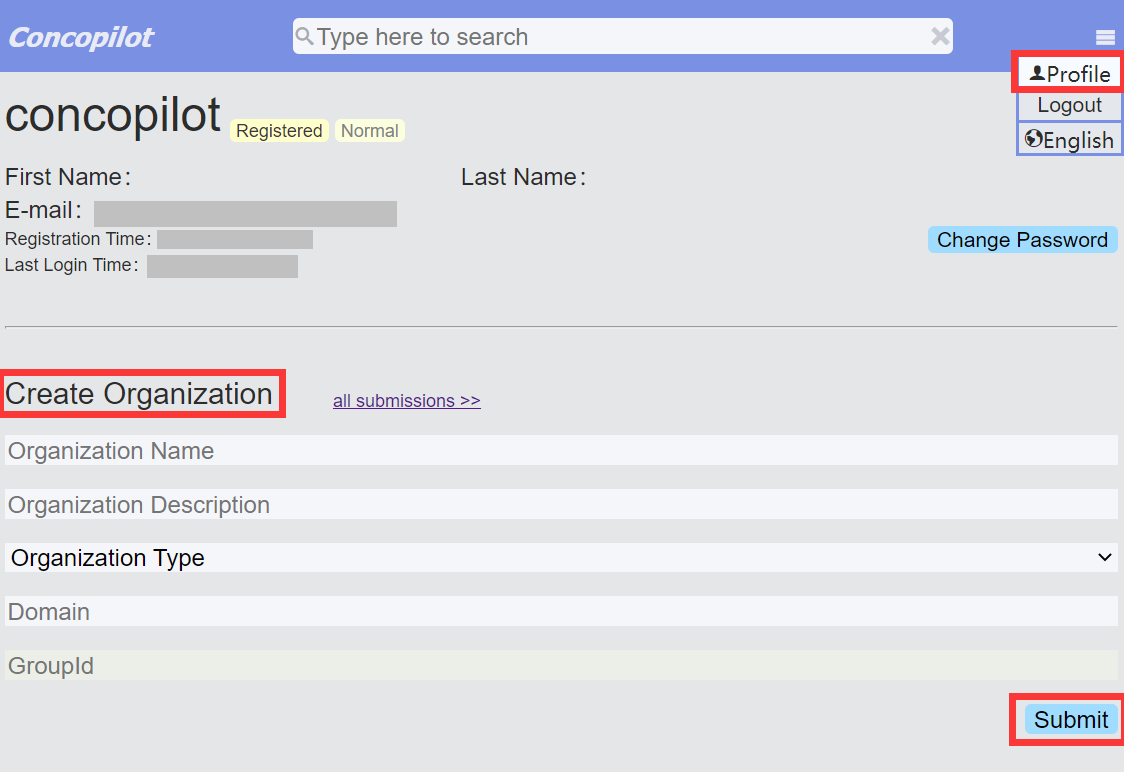
A domain of the organization should be provided during the creation. The system will generate a group_id from your domain.
After submit the creation, you can find a ticket with a ticket ID for the submission by clicking the "all submissions" link. The ticket ID is in this form: "CONCOPILOT-XXXXXX", where the "XXXXXX" is the tiket number. Record it for later use.
Then, a proof of the domain ownership should be provided.
People applying an organization group_id must create a TXT record contains exactly the ticket ID to prove the ownership of their domain. This is also the same with the Maven repository. Check this for detail, but remember to use the ConCopilot ticket ID, not the "OSSRH" one, you don't need to register a sonatype account because you are not going to deploy a Java package.
People applying a personal group_id only need to create a temporary, public repository with the name of the ticket created to register the group_id. E.g. if you want to use io.github.myusername you must create the public repository CONCOPILOT-TICKETNUMBER like this github.com/myusername/CONCOPILOT-TICKETNUMBER.
Waiting for the ticket result, you will find a pass label besides the ticket ID if your proof is accepted. Then you can push your components with the group_id to the remote repository.